

Mac browser for logins
The multi-account browser.
All your logins open at once.
Browsers aren't built for real life. Atrium is.
Keep several accounts on the same site side by side in one tab. Your AI works inside them; purchases wait for Allow.
Free for three logins · $29 once to own Pro · macOS 13 or later · version 0.63.41
Work across your accounts
Open and manage the accounts you use every day.
Keep them in one browser and work across them together. Your AI can help inside each account, with you making the final call.
01See every account side by side.
Keep three logins free or unlimited in Pro.02Open one page across every login.
Shift-Command-B opens a URL in every tile.03Your AI works inside your logins.
Connect more than 50 MCP tools in one line.04Purchases wait for your approval.
See the site, login, button, and total.05Financial logins stay walled off.
Blocks about 100 bank and brokerage sites.06Your accounts stay signed in.
Sessions refresh every three to 24 hours.07Flip through accounts one-handed.
Link by iPhone Camera; AutoFill with Face ID.08Hand your workspace to your team.
Drop one encrypted file into a shared folder.09Route any login on its own line.
Give each login its own proxy connection.Download freeEvery tile above is in the version you download today.
Multitab
Several accounts on the same site, in one tab.
Open multiple isolated sessions beside each other in a multitab. Extra logins pause as snapshots to keep your Mac light, then wake the moment you click them.
- 01Open a site in a multitab.
- 02Add another login beside it.
- 03Sign each tile in as someone else.
- 04Save it and reopen it by name.
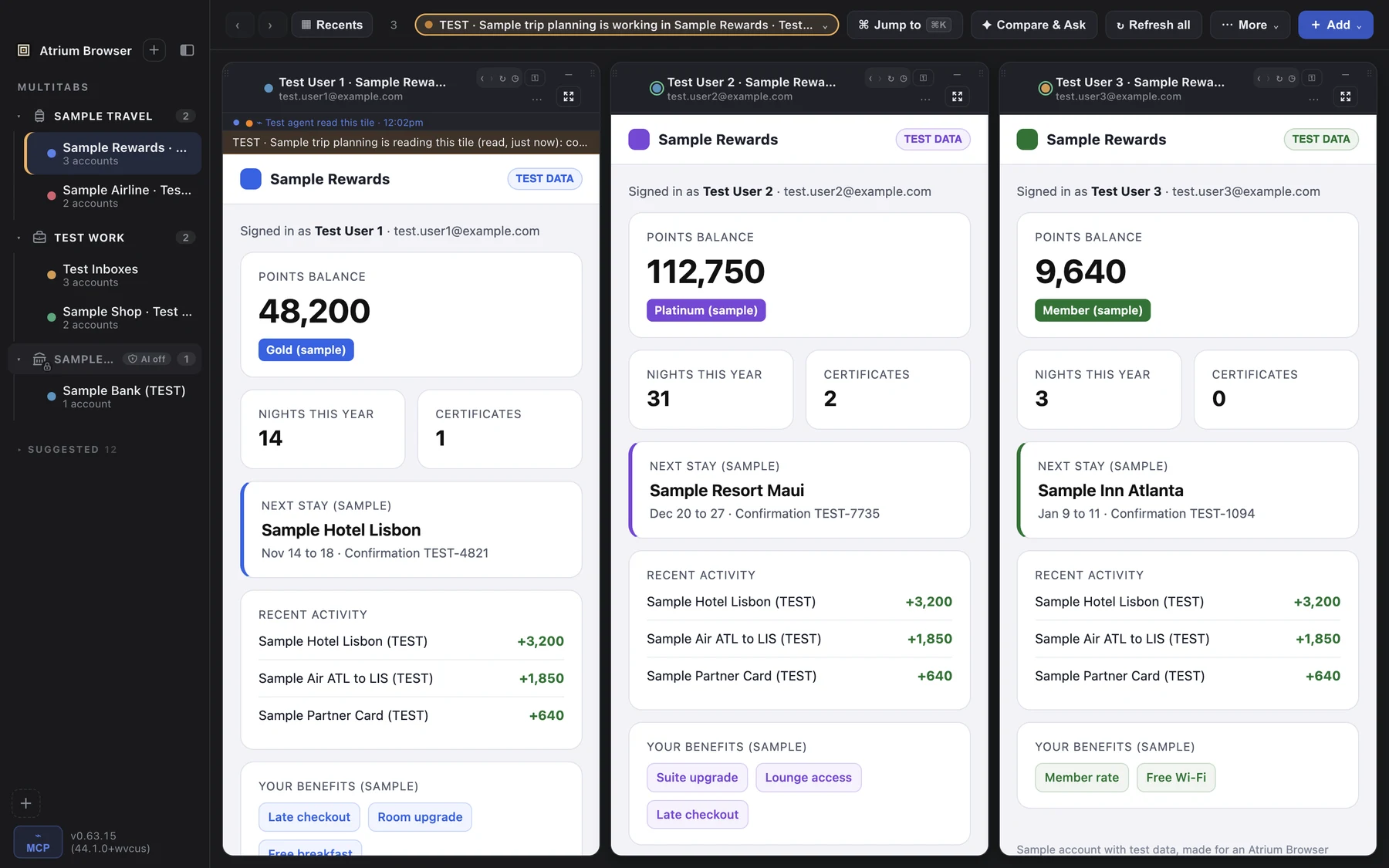
Test User 1
Sample Rewards
Points balance
48,200
Gold (sample)
Next stay
Sample Hotel Lisbon
Nov 14 to 18
Test User 2
Sample Rewards
Points balance
112,750
Platinum (sample)
Next stay
Sample Resort Maui
Dec 20 to 27
Type to all
Open a page across logins with one keystroke.
Press Shift-Command-B to open one address across every tile, Shift-Command-F to search each site at once, or Command-J to compare key numbers across logins and open a chat about them.
Type an address to open it in every tile in the multitab.Try typing, or drag a login to reorder it.
Built-in MCP server
Connect Claude to your browser with one line.
Your AI uses the free, built-in Model Context Protocol (MCP) server on your Mac, with more than 50 tools to read tiles, click, fill out forms, broadcast actions, and check loyalty balances.
$ claude mcp add --transport http account-gallery http://127.0.0.1:8765/mcp✓ Connected
> Check the points in every family tile and tell me whose to book under.
⏺ list_tiles()⏺ broadcast(url: "…/skymiles")⏺ read_loyalty(1) · read_loyalty(2) · read_loyalty(3)  You   84,210 miles
  Mom  152,600 miles
  Dad   39,075 miles
⏺ sign_in(id: "mom-delta")   no password field
Mom's account covers both seats. Booking under hers.
The Receipts view on your Mac logs every agent call. Shown here with a sample session and Atrium's actual tool names.
To read, click, fill, sign in, and compare
To connect Claude Code or Claude Desktop
On sign_in, which takes a login ID instead of a password field

Continue a checkout on sample-air.com?
The agent says: Moving to seat selection for the three fares you approved.
Allow cards
Purchases and payments always wait for you.
- 1Purchases, payments, checkouts, deletions, messages, and file uploads trigger an Allow card first.
- 2Each card names the website, login, Claude session, exact button, and page total.
- 3Choose Details, Deny, Allow once, or grant a one-hour pass for that login.
- 4Deny holds the focus, and the card closes itself after 45 seconds.
Financial protection
Banking, cards, and investing require your permission.
About 100 bank, card, brokerage, payroll, and tax sites, plus sites identified by keywords, need your approval before an agent can use them. Grant access for one hour, the rest of today, or seven days.
Let AI agents use Sample Bank?
Access ends by itself when the time is up. The arrow has longer options.
Passwords and sessions
Sign in once and stay signed in.
Auto sign-in logs your accounts back in and refreshes sessions every three, six, 12, or 24 hours. Agents call sign_in by login ID without a password field.
Across your devices
Use your accounts across Macs, iPhone, and your team.
Flip through saved accounts on iPhone, sync passwords across linked Macs, and share multitabs, folders, and routes with your team.

iPhone
Swipe between saved accounts, AutoFill with Face ID, and link to your Mac by pointing the iPhone Camera at a code.
Linked Macs
Match six digits on both Macs to sync saved passwords with end-to-end encryption.
Team layout
Export multitabs, folders, and routes as one encrypted file, leaving passwords and active sessions behind.
Who uses Atrium
For the days when you have several accounts to run.
Families and pointsCheck everyone's miles together.
View every family member's airline and hotel points side by side in one window.
Agencies and socialWork with every client signed in.
Keep every client signed in as you work, with no logging out or switching profiles.
BookkeepersKeep several client books open.
Open multiple client ledgers side by side in isolated sessions.
Multi-store sellersManage all your shops in one tab.
Put every storefront in one multitab with its own session and proxy.
AI power usersWork across several AI accounts.
Keep several Claude or AI accounts signed in together. Agents can work inside each one.
How it compares
Compare how each browser handles all your accounts.
| What you get | Atrium Browser | Shift | Multilogin | GoLogin | Rambox | Firefox Containers |
|---|---|---|---|---|---|---|
| See every account at once | Yes, tiles side by side | Tabs | Switch profiles | Switch profiles | Sidebar | Tabs |
| Cookie and session isolation | Yes, every login | Per app | Yes | Yes | Yes | Yes |
| Sessions survive restarts, kept fresh | Yes, refreshed on your schedule | Yes | Yes | Yes | Partial | Bugs reported |
| Saved layouts, reopened by name | Yes | No | No | No | Workspaces | No |
| Built-in MCP server in live, signed-in accounts | Yes, more than 50 tools | No | No | No | No | No |
| An approval card before an agent buys | Yes, every purchase | No | No | No | No | No |
| Real signed-in sessions on your own device | Yes | Yes | Anti-detect | Anti-detect | Yes | Yes |
| Own it with one payment | $29 once | $199.99/yr | $11/mo | $9/mo | $7/mo | Free |
Every rival price was read off that vendor's pricing page on August 14, 2026 (GoLogin re-checked August 15), at its lowest paid tier: billed monthly for Multilogin, GoLogin, and Rambox, and annually for Shift. Click any header name to verify. Multilogin and GoLogin sell device-fingerprint spoofing; in Atrium Browser, each tile is a standard Chrome session with optional per-tile proxy routing. More side by side: vs Chrome profiles, vs Firefox Containers, vs Shift, vs Rambox.
Pricing
Start free or own Pro for $29 once.
Free includes three logins per multitab and the MCP server. Pro is $29 once, normally $49. Premium adds hosted AI for $14.99 a month, billed annually.
Free
Free forever
- Three logins in each multitab
- Unlimited saved layouts, opened by name
- Per-tile login isolation
- Built-in MCP server for AI agents
- Bring your own AI key
Pro
Normally $49 · yours to keep
- Everything in Free
- Unlimited logins in each multitab
- Type to all, Search all, and Focus mode
- Keep every account signed in
- Layout presets and proxy routing
Premium
Billed annually · $179/yr
- Everything in Pro
- Hosted AI summaries with no API key to set up
- Priority input on what we build next
- Priority support
- Thirty-day money-back guarantee
The subscription tools compared above cost $7 to $11 a month, or $199.99 a year for Shift. Pay $29 once to own Atrium Browser.
Questions
What people ask first.
Does it work with any website?
Yes. Point a tile at any address and sign in the way you normally would. Each tile is a standard, signed-in browser session.
How is this different from Chrome profiles?
Chrome profiles keep you signed in, but each one has its own window to reopen and rearrange every session. In Atrium Browser, you see the accounts together and reopen your saved layout by name.
Is it safe to sign into so many accounts?
Each tile runs in its own isolated container on your Mac, with separate cookies for every login.
Who is Atrium Browser designed for?
People who manage several accounts they own: agencies, social managers, developers, and families. Each tile runs a standard signed-in Chrome session on your Mac, the same as signing in on a second computer.
Will my accounts get banned for using this?
Each tile runs a standard, current Chrome session with your normal IP and location by default. Starting in version 0.42.11, you can assign a proxy to any tile you choose. Agent clicks and form fills run inside that same visible session.
How does the AI part work?
The app runs a local MCP server on your Mac (loopback only) that answers your own MCP client. Connect Claude or another MCP client in one line to list, read, navigate, and screenshot tiles across more than 50 tools. Connected AI clients handle what they read under their own terms.
How many accounts can I open at once?
Free gives you three accounts in each multitab. Open as many as you want with Pro. Extra logins pause as snapshots until you click them, keeping a big multitab light on your Mac.
Is there a subscription?
Free covers three accounts in each multitab. Pay a one-time $29 to own Pro forever. If you want a subscription, Premium is an optional monthly membership with hosted AI, priority support, and priority input on what we build next.
Open all your logins at once.
Runs on Mac with Apple silicon and macOS 13 or later. Free download, signed and notarized.
Version 0.63.41 · Download page
Get the multi-account setup guide by email
Get the layouts people use most and instructions to connect your AI in one line.
Sent. Check your inbox for the guide.
One email with the guide, occasional updates after. Unsubscribe any time. Privacy